Search what you want

Labels

AI (1) Assembly (2) Cloud (1) Heuristic Evaluation (6) Java (1) Notifikasi (3) PPCD (4) R-Studio (3) TKI (1) WEKA (2) agribot (1) algoritma bioinformatika (5) algotithm (7) android studio (17) arduino (1) bahasa (2) barcode scanner (1) camera (1) catatan kuliah (4) classification (1) datamining (6) form (1) fragment (1) github (4) golang (2) gym (1) imk (1) informatiion retrival (1) ipb (1) jaringan (1) json (1) komdat (3) library (1) list view (1) orkom (1) pemprosesan parallel (4) python (1) security (1) semester 5 (1) sispak (3) spirit (1) tabs (1) teori (1) text (1) validator (1) view pager (1) web (3)
Showing posts with label Notifikasi. Show all posts

Tuesday, March 8, 2016

Create Push Notification with Google Cloud Messaging (2/3)


1. open android studio and make new project.
2. create 4 folder under your package. "activity", "app", "gcm", "helper"
3. open file gradle under app, and paste this code. so, sync this project
    compile 'com.android.support:appcompat-v7:23.1.1'
    compile 'com.google.android.gms:play-services:8.4.0'
    compile 'com.android.support:design:23.1.1'
    compile 'com.mcxiaoke.volley:library-aar:1.0.0'
    compile 'com.android.support:recyclerview-v7:23.1.1'
3. move MainActivity.java to activity package.
4. create Config.java, and paste this code
public class Config {

    // flag to identify whether to show single line
    // or multi line text in push notification tray
    public static boolean appendNotificationMessages = true;

    // global topic to receive app wide push notifications
    public static final String TOPIC_GLOBAL = "global";

    // broadcast receiver intent filters
    public static final String SENT_TOKEN_TO_SERVER = "sentTokenToServer";
    public static final String REGISTRATION_COMPLETE = "registrationComplete";
    public static final String PUSH_NOTIFICATION = "pushNotification";

    // type of push messages
    public static final int PUSH_TYPE_CHATROOM = 1;
    public static final int PUSH_TYPE_USER = 2;

    // id to handle the notification in the notification try
    public static final int NOTIFICATION_ID = 100;
    public static final int NOTIFICATION_ID_BIG_IMAGE = 101;
}
5. create MyApplication under app directory, and paste this code
public class MyApplication extends Application {

    public static final String TAG = MyApplication.class
            .getSimpleName();

    private static MyApplication mInstance;

    private MyPreferenceManager pref;

    @Override
    public void onCreate() {
        super.onCreate();
        mInstance = this;
    }

    public static synchronized MyApplication getInstance() {
        return mInstance;
    }


    public MyPreferenceManager getPrefManager() {
        if (pref == null) {
            pref = new MyPreferenceManager(this);
        }

        return pref;
    }
}
6. create NotificationUtils.java and paste this code
public class NotificationUtils {

    private static String TAG = NotificationUtils.class.getSimpleName();

    private Context mContext;

    public NotificationUtils() {
    }

    public NotificationUtils(Context mContext) {
        this.mContext = mContext;
    }

    public void showNotificationMessage(String title, String message, String timeStamp, Intent intent) {
        showNotificationMessage(title, message, timeStamp, intent, null);
    }

    public void showNotificationMessage(final String title, final String message, final String timeStamp, Intent intent, String imageUrl) {
        // Check for empty push message
        if (TextUtils.isEmpty(message))
            return;


        // notification icon
        final int icon = R.mipmap.ic_launcher;

        intent.setFlags(Intent.FLAG_ACTIVITY_CLEAR_TOP | Intent.FLAG_ACTIVITY_SINGLE_TOP);
        final PendingIntent resultPendingIntent =
                PendingIntent.getActivity(
                        mContext,
                        0,
                        intent,
                        PendingIntent.FLAG_CANCEL_CURRENT
                );

        final NotificationCompat.Builder mBuilder = new NotificationCompat.Builder(
                mContext);

        final Uri alarmSound = Uri.parse(ContentResolver.SCHEME_ANDROID_RESOURCE
                + "://" + mContext.getPackageName() + "/raw/notification");

        if (!TextUtils.isEmpty(imageUrl)) {

            if (imageUrl != null && imageUrl.length() > 4 && Patterns.WEB_URL.matcher(imageUrl).matches()) {

                Bitmap bitmap = getBitmapFromURL(imageUrl);

                if (bitmap != null) {
                    showBigNotification(bitmap, mBuilder, icon, title, message, timeStamp, resultPendingIntent, alarmSound);
                } else {
                    showSmallNotification(mBuilder, icon, title, message, timeStamp, resultPendingIntent, alarmSound);
                }
            }
        } else {
            showSmallNotification(mBuilder, icon, title, message, timeStamp, resultPendingIntent, alarmSound);
            playNotificationSound();
        }
    }


    private void showSmallNotification(NotificationCompat.Builder mBuilder, int icon, String title, String message, String timeStamp, PendingIntent resultPendingIntent, Uri alarmSound) {

        NotificationCompat.InboxStyle inboxStyle = new NotificationCompat.InboxStyle();

        if (Config.appendNotificationMessages) {
            // store the notification in shared pref first
            MyApplication.getInstance().getPrefManager().addNotification(message);

            // get the notifications from shared preferences
            String oldNotification = MyApplication.getInstance().getPrefManager().getNotifications();

            List<String> messages = Arrays.asList(oldNotification.split("\\|"));

            for (int i = messages.size() - 1; i >= 0; i--) {
                inboxStyle.addLine(messages.get(i));
            }
        } else {
            inboxStyle.addLine(message);
        }


        Notification notification;
        notification = mBuilder.setSmallIcon(icon).setTicker(title).setWhen(0)
                .setAutoCancel(true)
                .setContentTitle(title)
                .setContentIntent(resultPendingIntent)
                .setSound(alarmSound)
                .setStyle(inboxStyle)
                .setWhen(getTimeMilliSec(timeStamp))
                .setSmallIcon(R.mipmap.ic_launcher)
                .setLargeIcon(BitmapFactory.decodeResource(mContext.getResources(), icon))
                .setContentText(message)
                .build();

        NotificationManager notificationManager = (NotificationManager) mContext.getSystemService(Context.NOTIFICATION_SERVICE);
        notificationManager.notify(Config.NOTIFICATION_ID, notification);
    }

    private void showBigNotification(Bitmap bitmap, NotificationCompat.Builder mBuilder, int icon, String title, String message, String timeStamp, PendingIntent resultPendingIntent, Uri alarmSound) {
        NotificationCompat.BigPictureStyle bigPictureStyle = new NotificationCompat.BigPictureStyle();
        bigPictureStyle.setBigContentTitle(title);
        bigPictureStyle.setSummaryText(Html.fromHtml(message).toString());
        bigPictureStyle.bigPicture(bitmap);
        Notification notification;
        notification = mBuilder.setSmallIcon(icon).setTicker(title).setWhen(0)
                .setAutoCancel(true)
                .setContentTitle(title)
                .setContentIntent(resultPendingIntent)
                .setSound(alarmSound)
                .setStyle(bigPictureStyle)
                .setWhen(getTimeMilliSec(timeStamp))
                .setSmallIcon(R.mipmap.ic_launcher)
                .setLargeIcon(BitmapFactory.decodeResource(mContext.getResources(), icon))
                .setContentText(message)
                .build();

        NotificationManager notificationManager = (NotificationManager) mContext.getSystemService(Context.NOTIFICATION_SERVICE);
        notificationManager.notify(Config.NOTIFICATION_ID_BIG_IMAGE, notification);
    }

    /**
     * Downloading push notification image before displaying it in
     * the notification tray
     */
    public Bitmap getBitmapFromURL(String strURL) {
        try {
            URL url = new URL(strURL);
            HttpURLConnection connection = (HttpURLConnection) url.openConnection();
            connection.setDoInput(true);
            connection.connect();
            InputStream input = connection.getInputStream();
            Bitmap myBitmap = BitmapFactory.decodeStream(input);
            return myBitmap;
        } catch (IOException e) {
            e.printStackTrace();
            return null;
        }
    }

    // Playing notification sound
    public void playNotificationSound() {
        try {
            Uri alarmSound = Uri.parse(ContentResolver.SCHEME_ANDROID_RESOURCE
                    + "://" + MyApplication.getInstance().getApplicationContext().getPackageName() + "/raw/notification");
            Ringtone r = RingtoneManager.getRingtone(MyApplication.getInstance().getApplicationContext(), alarmSound);
            r.play();
        } catch (Exception e) {
            e.printStackTrace();
        }
    }

    /**
     * Method checks if the app is in background or not
     */
    public static boolean isAppIsInBackground(Context context) {
        boolean isInBackground = true;
        ActivityManager am = (ActivityManager) context.getSystemService(Context.ACTIVITY_SERVICE);
        if (Build.VERSION.SDK_INT > Build.VERSION_CODES.KITKAT_WATCH) {
            List<ActivityManager.RunningAppProcessInfo> runningProcesses = am.getRunningAppProcesses();
            for (ActivityManager.RunningAppProcessInfo processInfo : runningProcesses) {
                if (processInfo.importance == ActivityManager.RunningAppProcessInfo.IMPORTANCE_FOREGROUND) {
                    for (String activeProcess : processInfo.pkgList) {
                        if (activeProcess.equals(context.getPackageName())) {
                            isInBackground = false;
                        }
                    }
                }
            }
        } else {
            List<ActivityManager.RunningTaskInfo> taskInfo = am.getRunningTasks(1);
            ComponentName componentInfo = taskInfo.get(0).topActivity;
            if (componentInfo.getPackageName().equals(context.getPackageName())) {
                isInBackground = false;
            }
        }

        return isInBackground;
    }

    // Clears notification tray messages
    public static void clearNotifications() {
        NotificationManager notificationManager = (NotificationManager) MyApplication.getInstance().getSystemService(Context.NOTIFICATION_SERVICE);
        notificationManager.cancelAll();
    }

    public static long getTimeMilliSec(String timeStamp) {
        SimpleDateFormat format = new SimpleDateFormat("yyyy-MM-dd HH:mm:ss");
        try {
            Date date = format.parse(timeStamp);
            return date.getTime();
        } catch (ParseException e) {
            e.printStackTrace();
        }
        return 0;
    }
}
7. create MyInstanceIDListenerService.java under gcm package and paste this code
public class MyInstanceIDListenerService extends InstanceIDListenerService {

    private static final String TAG = MyInstanceIDListenerService.class.getSimpleName();

    /**
     * Called if InstanceID token is updated. This may occur if the security of
     * the previous token had been compromised. This call is initiated by the
     * InstanceID provider.
     */
    @Override
    public void onTokenRefresh() {
        Log.e(TAG, "onTokenRefresh");
        // Fetch updated Instance ID token and notify our app's server of any changes (if applicable).
        Intent intent = new Intent(this, GcmIntentService.class);
        startService(intent);
    }
}
8. create MyGcmPushReceiver.java and paste this code
public class MyGcmPushReceiver extends GcmListenerService {

    private static final String TAG = MyGcmPushReceiver.class.getSimpleName();

    private NotificationUtils notificationUtils;

    /**
     * Called when message is received.
     *
     * @param from   SenderID of the sender.
     * @param bundle Data bundle containing message data as key/value pairs.
     *               For Set of keys use data.keySet().
     */

    @Override
    public void onMessageReceived(String from, Bundle bundle) {
        String title = bundle.getString("title");
        String message = bundle.getString("message");
        String image = bundle.getString("image");
        String timestamp = bundle.getString("created_at");
        Log.e(TAG, "From: " + from);
        Log.e(TAG, "Title: " + title);
        Log.e(TAG, "message: " + message);
        Log.e(TAG, "image: " + image);
        Log.e(TAG, "timestamp: " + timestamp);

        if (!NotificationUtils.isAppIsInBackground(getApplicationContext())) {

            // app is in foreground, broadcast the push message
            Intent pushNotification = new Intent(Config.PUSH_NOTIFICATION);
            pushNotification.putExtra("message", message);
            LocalBroadcastManager.getInstance(this).sendBroadcast(pushNotification);

            // play notification sound
            NotificationUtils notificationUtils = new NotificationUtils();
            notificationUtils.playNotificationSound();
        } else {

            Intent resultIntent = new Intent(getApplicationContext(), MainActivity.class);
            resultIntent.putExtra("message", message);

            if (TextUtils.isEmpty(image)) {
                showNotificationMessage(getApplicationContext(), title, message, timestamp, resultIntent);
            } else {
                showNotificationMessageWithBigImage(getApplicationContext(), title, message, timestamp, resultIntent, image);
            }
        }
    }

    /**
     * Showing notification with text only
     */
    private void showNotificationMessage(Context context, String title, String message, String timeStamp, Intent intent) {
        notificationUtils = new NotificationUtils(context);
        intent.setFlags(Intent.FLAG_ACTIVITY_NEW_TASK | Intent.FLAG_ACTIVITY_CLEAR_TASK);
        notificationUtils.showNotificationMessage(title, message, timeStamp, intent);
    }

    /**
     * Showing notification with text and image
     */
    private void showNotificationMessageWithBigImage(Context context, String title, String message, String timeStamp, Intent intent, String imageUrl) {
        notificationUtils = new NotificationUtils(context);
        intent.setFlags(Intent.FLAG_ACTIVITY_NEW_TASK | Intent.FLAG_ACTIVITY_CLEAR_TASK);
        notificationUtils.showNotificationMessage(title, message, timeStamp, intent, imageUrl);
    }
}
9. create GcmIntentService.java under gcm package and paste this code
public class GcmIntentService extends IntentService {

    private static final String TAG = GcmIntentService.class.getSimpleName();

    public GcmIntentService() {
        super(TAG);
    }

    public static final String KEY = "key";
    public static final String TOPIC = "topic";
    public static final String SUBSCRIBE = "subscribe";
    public static final String UNSUBSCRIBE = "unsubscribe";


    @Override
    protected void onHandleIntent(Intent intent) {
        String key = intent.getStringExtra(KEY);
        switch (key) {
            case SUBSCRIBE:
                // subscribe to a topic
                String topic = intent.getStringExtra(TOPIC);
                subscribeToTopic(topic);
                break;
            case UNSUBSCRIBE:
                String topic1 = intent.getStringExtra(TOPIC);
                unsubscribeFromTopic(topic1);
                break;
            default:
                // if key is not specified, register with GCM
                registerGCM();
        }

    }

    /**
     * Registering with GCM and obtaining the gcm registration id
     */
    private void registerGCM() {
        SharedPreferences sharedPreferences = PreferenceManager.getDefaultSharedPreferences(this);
        String token = null;

        try {
            InstanceID instanceID = InstanceID.getInstance(this);
            token = instanceID.getToken(getString(R.string.gcm_defaultSenderId),
                    GoogleCloudMessaging.INSTANCE_ID_SCOPE, null);

            Log.e(TAG, "GCM Registration Token: " + token);

            // sending the registration id to our server
            sendRegistrationToServer(token);

            sharedPreferences.edit().putBoolean(Config.SENT_TOKEN_TO_SERVER, true).apply();
        } catch (Exception e) {
            Log.e(TAG, "Failed to complete token refresh", e);

            sharedPreferences.edit().putBoolean(Config.SENT_TOKEN_TO_SERVER, false).apply();
        }
        // Notify UI that registration has completed, so the progress indicator can be hidden.
        Intent registrationComplete = new Intent(Config.REGISTRATION_COMPLETE);
        registrationComplete.putExtra("token", token);
        LocalBroadcastManager.getInstance(this).sendBroadcast(registrationComplete);
    }

    private void sendRegistrationToServer(final String token) {
        // Send the registration token to our server
        // to keep it in MySQL

    }

    /**
     * Subscribe to a topic
     */
    public void subscribeToTopic(String topic) {
        GcmPubSub pubSub = GcmPubSub.getInstance(getApplicationContext());
        InstanceID instanceID = InstanceID.getInstance(getApplicationContext());
        String token = null;
        try {
            token = instanceID.getToken(getString(R.string.gcm_defaultSenderId),
                    GoogleCloudMessaging.INSTANCE_ID_SCOPE, null);
            if (token != null) {
                pubSub.subscribe(token, "/topics/" + topic, null);
                Log.e(TAG, "Subscribed to topic: " + topic);
            } else {
                Log.e(TAG, "error: gcm registration id is null");
            }
        } catch (IOException e) {
            Log.e(TAG, "Topic subscribe error. Topic: " + topic + ", error: " + e.getMessage());
            Toast.makeText(getApplicationContext(), "Topic subscribe error. Topic: " + topic + ", error: " + e.getMessage(), Toast.LENGTH_SHORT).show();
        }
    }

    public void unsubscribeFromTopic(String topic) {
        GcmPubSub pubSub = GcmPubSub.getInstance(getApplicationContext());
        InstanceID instanceID = InstanceID.getInstance(getApplicationContext());
        String token = null;
        try {
            token = instanceID.getToken(getString(R.string.gcm_defaultSenderId),
                    GoogleCloudMessaging.INSTANCE_ID_SCOPE, null);
            if (token != null) {
                pubSub.unsubscribe(token, "");
                Log.e(TAG, "Unsubscribed from topic: " + topic);
            } else {
                Log.e(TAG, "error: gcm registration id is null");
            }
        } catch (IOException e) {
            Log.e(TAG, "Topic unsubscribe error. Topic: " + topic + ", error: " + e.getMessage());
            Toast.makeText(getApplicationContext(), "Topic subscribe error. Topic: " + topic + ", error: " + e.getMessage(), Toast.LENGTH_SHORT).show();
        }
    }
}
10. MyPreferenceManager.java under helper folder and paste this code
public class MyPreferenceManager {

    private String TAG = MyPreferenceManager.class.getSimpleName();

    // Shared Preferences
    SharedPreferences pref;

    // Editor for Shared preferences
    SharedPreferences.Editor editor;

    // Context
    Context _context;

    // Shared pref mode
    int PRIVATE_MODE = 0;

    // Sharedpref file name
    private static final String PREF_NAME = "androidhive_gcm";

    // All Shared Preferences Keys
    private static final String KEY_USER_ID = "user_id";
    private static final String KEY_USER_NAME = "user_name";
    private static final String KEY_USER_EMAIL = "user_email";
    private static final String KEY_NOTIFICATIONS = "notifications";

    // Constructor
    public MyPreferenceManager(Context context) {
        this._context = context;
        pref = _context.getSharedPreferences(PREF_NAME, PRIVATE_MODE);
        editor = pref.edit();
    }

    public void addNotification(String notification) {

        // get old notifications
        String oldNotifications = getNotifications();

        if (oldNotifications != null) {
            oldNotifications += "|" + notification;
        } else {
            oldNotifications = notification;
        }

        editor.putString(KEY_NOTIFICATIONS, oldNotifications);
        editor.commit();
    }

    public String getNotifications() {
        return pref.getString(KEY_NOTIFICATIONS, null);
    }

    public void clear() {
        editor.clear();
        editor.commit();
    }
}
11. open Manifests.xml, and configure  until same whit this code
<?xml version="1.0" encoding="utf-8"?>
<manifest xmlns:android="http://schemas.android.com/apk/res/android"
    package="ipb.iot.ardhi.skripsian">

    <uses-permission android:name="com.google.android.c2dm.permission.RECEIVE" />
    <uses-permission android:name="android.permission.INTERNET" />

    <!-- needed for older devices -
     used to check app background / foreground status -->
    <uses-permission android:name="android.permission.GET_TASKS" />

    <!-- START Added for GCM -->
    <uses-permission android:name="android.permission.WAKE_LOCK" />
    <permission
        android:name="ipb.iot.ardhi.skripsian.permission.C2D_MESSAGE"
        android:protectionLevel="signature" />

    <uses-permission android:name="ipb.iot.ardhi.skripsian.permission.C2D_MESSAGE" />
    <!-- END Added for GCM -->
    <application
        android:allowBackup="true"
        android:icon="@mipmap/ic_launcher"
        android:label="@string/app_name"
        android:supportsRtl="true"
        android:name=".app.MyApplication"
        android:theme="@style/AppTheme">
        <activity android:name=".activity.MainActivity"
            android:label="@string/app_name"
            android:theme="@style/AppTheme.NoActionBar">
            <intent-filter>
                <action android:name="android.intent.action.MAIN" />

                <category android:name="android.intent.category.LAUNCHER" />
            </intent-filter>
        </activity>

        <!-- START Added for GCM -->
        <receiver
            android:name="com.google.android.gms.gcm.GcmReceiver"
            android:exported="true"
            android:permission="com.google.android.c2dm.permission.SEND">
            <intent-filter>
                <action android:name="com.google.android.c2dm.intent.RECEIVE" />

                <category android:name="ipb.iot.ardhi.skripsian" />
            </intent-filter>
        </receiver>

        <service
            android:name=".gcm.MyGcmPushReceiver"
            android:exported="false">
            <intent-filter>
                <action android:name="com.google.android.c2dm.intent.RECEIVE" />
            </intent-filter>
        </service>

        <service
            android:name=".gcm.GcmIntentService"
            android:exported="false">
            <intent-filter>
                <action android:name="com.google.android.gms.iid.InstanceID" />
            </intent-filter>
        </service>
        <!-- END Added for GCM -->
    </application>
</manifest>
12. style.xml
<resources>

    <!-- Base application theme. -->
    <style name="AppTheme" parent="Theme.AppCompat.Light.DarkActionBar">
        <!-- Customize your theme here. -->
        <item name="colorPrimary">@color/colorPrimary</item>
        <item name="colorPrimaryDark">@color/colorPrimaryDark</item>
        <item name="colorAccent">@color/colorAccent</item>
    </style>
    <style name="AppTheme.NoActionBar">
        <item name="windowActionBar">false</item>
        <item name="windowNoTitle">true</item>
    </style>

    <style name="AppTheme.PopupOverlay" parent="ThemeOverlay.AppCompat.Light" />
    <style name="AppTheme.AppBarOverlay" parent="ThemeOverlay.AppCompat.Dark.ActionBar" />
</resources>
13. activity_main.xml
<?xml version="1.0" encoding="utf-8"?>
<android.support.design.widget.CoordinatorLayout
    xmlns:android="http://schemas.android.com/apk/res/android"
    xmlns:app="http://schemas.android.com/apk/res-auto"
    xmlns:tools="http://schemas.android.com/tools"
    android:layout_width="match_parent"
    android:layout_height="match_parent"
    android:fitsSystemWindows="true"
    tools:context=".activity.MainActivity">

    <android.support.design.widget.AppBarLayout
        android:layout_height="wrap_content"
        android:layout_width="match_parent"
        android:theme="@style/AppTheme.AppBarOverlay">

        <android.support.v7.widget.Toolbar
            android:id="@+id/toolbar"
            android:layout_width="match_parent"
            android:layout_height="?attr/actionBarSize"
            android:background="?attr/colorPrimary"
            app:popupTheme="@style/AppTheme.PopupOverlay" />

    </android.support.design.widget.AppBarLayout>

    <!--<include layout="@layout/content_main"/>-->

</android.support.design.widget.CoordinatorLayout>
14. run this project to your phone
15. you will get token number

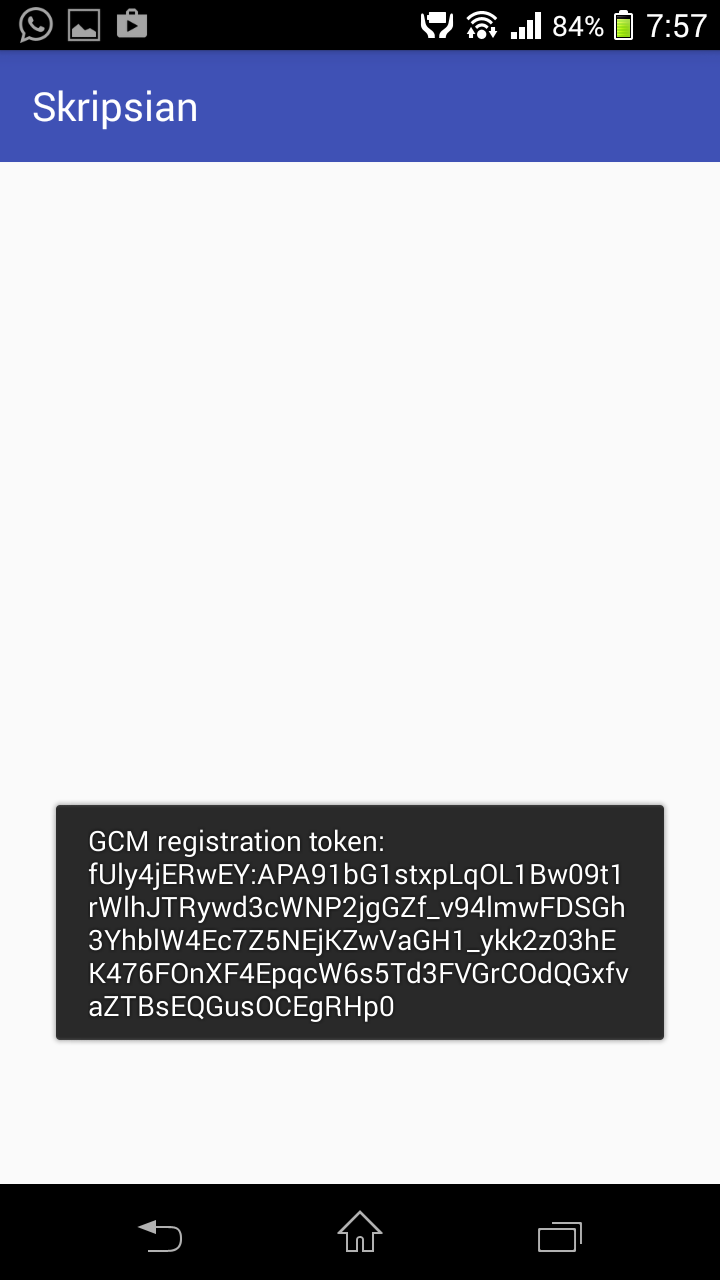
16. open rest client in chrome

17. Click send 

18. in your phone you will get this

19. you have to what that do with this code. hehe


until on it this tutorial, i will write another tutorial how to handle notification to change activity to our application.

====================================sekian===============================

ref:http://www.androidhive.info/2016/02/android-push-notifications-using-gcm-php-mysql-realtime-chat-app-part-2


Monday, March 7, 2016

Create Push Notification with Google Cloud Messaging (1/3)

referensi:
http://www.androidhive.info/2016/02/android-push-notifications-using-gcm-php-mysql-realtime-chat-app-part-1/


=====================Configurasi di Google Console=============================
1. login dengan akun google
2. kunjungi situs Google Console untuk membuat projek baru.

3. Buat projek baru -> Create project
4. tampilan dashboard, klik Enable and manage APIs

5. klik Module APIs -> Google Cloud Messaging

6. klik enable

7. go to Credentials

8. klik create credentials

9. klik API key

10. klik server key

11. create credentials

12. get API key

13. konfigurasi di google console telah selesai.


========================== Configurasi di Server pribadi=========================

2. Tambahkan variabel di file untuk configurasi database. daftarkan API key dari google console
<?php
/**
 * Database configuration
 */
define('DB_USERNAME', 'root');
define('DB_PASSWORD', '03011995');
define('DB_HOST', 'localhost');
define('DB_NAME', 'restapi');

define('USER_CREATED_SUCCESSFULLY', 0);
define('USER_CREATE_FAILED', 1);
define('USER_ALREADY_EXISTED', 2);

define("GOOGLE_API_KEY", "AIzaSyCcIzHEjrhU9Wd08xxxxxxxxxxxxxxxxxxxx");

?>
3. Tambahkan colom gcm_registration_id di tabel users
ALTER TABLE `users` ADD `gcm_registration_id` TEXT NOT NULL AFTER `api_key` ;
4. Tambahkan method "updateGcmID" di DBHandler.php
// updating user GCM registration ID
    public function updateGcmID($user_id, $gcm_registration_id) {
        $response = array();
        $stmt = $this->conn->prepare("UPDATE users SET gcm_registration_id = ? WHERE user_id = ?");
        $stmt->bind_param("si", $gcm_registration_id, $user_id);
 
        if ($stmt->execute()) {
            // User successfully updated
            $response["error"] = false;
            $response["message"] = 'GCM registration ID updated successfully';
        } else {
            // Failed to update user
            $response["error"] = true;
            $response["message"] = "Failed to update GCM registration ID";
            $stmt->error;
        }
        $stmt->close();
 
        return $response;
    }
5.  Tambahkan folder "gcm" di dalam folder "libs"

6. Tambahkan file "gcm.php" dan "push.php"

7. tambahkan code berikut di gcm.php
<?php

class gcm {
    // constructor
    function __construct() {
         
    }
 
    // sending push message to single user by gcm registration id
    public function send($to, $message) {
        $fields = array(
            'to' => $to,
            'data' => $message,
        );
        return $this->sendPushNotification($fields);
    }
    
    // Sending message to a topic by topic id
    public function sendToTopic($to, $message) {
        $fields = array(
            'to' => '/topics/' . $to,
            'data' => $message,
        );
        return $this->sendPushNotification($fields);
    }
    
    // function makes curl request to gcm servers
    private function sendPushNotification($fields) {
 
        // include config
        include_once __DIR__ . '/../../include/Config.php';
 
        // Set POST variables
        $url = 'https://gcm-http.googleapis.com/gcm/send';
 
        $headers = array(
            'Authorization: key=' . GOOGLE_API_KEY,
            'Content-Type: application/json'
        );
        // Open connection
        $ch = curl_init();
 
        // Set the url, number of POST vars, POST data
        curl_setopt($ch, CURLOPT_URL, $url);
 
        curl_setopt($ch, CURLOPT_POST, true);
        curl_setopt($ch, CURLOPT_HTTPHEADER, $headers);
        curl_setopt($ch, CURLOPT_RETURNTRANSFER, true);
 
        // Disabling SSL Certificate support temporarly
        curl_setopt($ch, CURLOPT_SSL_VERIFYPEER, false);
 
        curl_setopt($ch, CURLOPT_POSTFIELDS, json_encode($fields));
 
        // Execute post
        $result = curl_exec($ch);
        if ($result === FALSE) {
            die('Curl failed: ' . curl_error($ch));
        }
 
        // Close connection
        curl_close($ch);
 
        return $result;
    }
}

?>
8. tambahkan code berikut di push.php
<?php
/**
 * @author Ravi Tamada
 * @link URL Tutorial link
 */
 
class Push{
    // push message title
    private $title;
     
    // push message payload
    private $data;
     
    // flag indicating background task on push received
    private $is_background;
     
    // flag to indicate the type of notification
    private $flag;
     
    function __construct() {
         
    }
     
    public function setTitle($title){
        $this->title = $title;
    }
     
    public function setData($data){
        $this->data = $data;
    }
     
    public function setIsBackground($is_background){
        $this->is_background = $is_background;
    }
     
    public function setFlag($flag){
        $this->flag = $flag;
    }
     
    public function getPush(){
        $res = array();
        $res['title'] = $this->title;
        $res['is_background'] = $this->is_background;
        $res['flag'] = $this->flag;
        $res['data'] = $this->data;
         
        return $res;
    }
}
9. di file index.php yang berada di folder v1 tambahkan method untuk melakukan update untuk gcm_registration_id
/* * *
 * Updating user
 *  we use this url to update user's gcm registration id
 */
$app->put('/users', 'authenticate', function() use ($app) {
    global $user_id;
 
    verifyRequiredParams(array('gcm_registration_id'));
 
    $gcm_registration_id = $app->request->put('gcm_registration_id');
 
    $db = new DbHandler();
    $response = $db->updateGcmID($user_id, $gcm_registration_id);
 
    echoRespnse(200, $response);
});
10. ubah method untuk menambahkan task, agar ketika data masuk ke server, ada notifikasi ke aplikasi mobile yang kita miliki
/**
 * Creating new task in db
 * method POST
 * params - name
 * url - /tasks/
 */
$app->post('/tasks', 'authenticate', function() use ($app) {
    // check for required params
    verifyRequiredParams(array('sensor1', 'sensor2', 'sensor3', 'output'));

    $response = array();
    $sensor1 = $app->request->post('sensor1');
    $sensor2 = $app->request->post('sensor2');
    $sensor3 = $app->request->post('sensor3');
    $output = $app->request->post('output');

    global $user_id;
    $db = new DbHandler();

    // creating new task
    $task_id = $db->createTask($user_id, $sensor1, $sensor2, $sensor3, $output);

    if ($task_id != NULL) {
        require_once __DIR__ . '/../libs/gcm/gcm.php';
        require_once __DIR__ . '/../libs/gcm/push.php';
        $gcm = new GCM();
        $push = new Push();
        
        $user = $db->getUser($user_id);
        
        $msg = array();
        $msg['message'] = "pH : ".$sensor1."; Suhu : ".$sensor2."; DO : ".$sensor3."; Output : ".$output;
        $msg['message_id'] = '';
        $msg['chat_room_id'] = '';
        $msg['created_at'] = date('Y-m-d G:i:s');

        $data = array();
        $data['user'] = $user;
        $data['message'] = $msg;
        $data['image'] = '';

        $push->setTitle("Google Cloud Messaging");
        $push->setIsBackground(FALSE);
        $push->setFlag(PUSH_FLAG_USER);
        $push->setData($data);
        
        // sending message to topic `global`
        // On the device every user should subscribe to `global` topic
        $gcm->sendToTopic('global', $push->getPush());

        $response['user'] = $user;
        $response['error'] = false;
        
        echoRespnse(201, $push->getPush());
    } else {
        $response["error"] = true;
        $response["message"] = "Failed to create task. Please try again";
        echoRespnse(200, $response);
    }
});


Thursday, December 17, 2015

Push Notification with Parse.com [Android Studio]

Beberapa hari ini saya berfikir bagaimana cara membuat sebuaah aplikasi yang memiliki notifikasi. Mulai dari situ saya mencari-cari beberapa situs yang menyediakan notifikasi. mulai dari pubnub.com, firebase.com, parse.com, dan google cloud message (gcm). Tepatnya mulai dari 2 hari kemarin (selasa, 15-Des-2015) satu persatu situs tersebut mulai saya jajal, alhasil malam ini saya baru berhasil mengimplementasikan push notifikasi dari situs parse.com, walaupun belum maksimal hasilnya, tetapi bisa memuaskan keingintahuan saya untuk membuat notifikasi di android ini. Hasil dari "tahap pencarian" saya, saya coba jabarkan di artikel ini.

referensi: http://www.androidhive.info/2015/06/android-push-notifications-using-parse-com/

Langkah-Langkah:

1. Lakukan Sign up pada parse.com

2. Membuat projek baru
beri nama. misal <parse>


3. Akses Application ID dan Client Key projek yang sudah di buat


4. Membuat project baru di android Studio. source code bisa di ambil disini -> https://github.com/ardhimaarik/parse

 File - > New -> New Project...

atau 

Start a new Android Studio Project


5. Download Parse-1.9.1.jar


6. Set depedency di build.gradle(Module:app)


dependencies {
    compile fileTree(dir: 'libs', include: ['*.jar'])
    testCompile 'junit:junit:4.12'
    compile 'com.android.support:appcompat-v7:23.1.1'
    compile 'com.parse.bolts:bolts-android:1.+'
    compile fileTree(dir: 'libs', include: 'Parse-*.jar')
}
Klik 

6. Buatlah struktur folder seperti gambar dibawah ini


================================ LayOut=================================

7. activity_login.xml

<RelativeLayout xmlns:android="http://schemas.android.com/apk/res/android"
    xmlns:tools="http://schemas.android.com/tools"
    android:layout_width="match_parent"
    android:layout_height="match_parent"
    android:background="#ffffff"
    tools:context="info.androidhive.parsenotifications.activity.LoginActivity">

    <LinearLayout
        android:layout_width="fill_parent"
        android:layout_height="wrap_content"
        android:layout_centerInParent="true"
        android:gravity="center"
        android:orientation="vertical"
        android:paddingBottom="10dp"
        android:paddingTop="10dp">

        <TextView
            android:layout_width="fill_parent"
            android:layout_height="wrap_content"
            android:fontFamily="sans-serif-light"
            android:gravity="center_horizontal"
            android:text="Parse Notifications"
            android:textColor="#218eed"
            android:textSize="24dp" />

        <TextView
            android:layout_width="fill_parent"
            android:layout_height="wrap_content"
            android:layout_marginBottom="20dp"
            android:fontFamily="sans-serif-light"
            android:gravity="center_horizontal"
            android:paddingLeft="20dp"
            android:paddingRight="20dp"
            android:text="Enter your email address to subscribe to parse channel!"
            android:textColor="#9d9d9d"
            android:textSize="16dp" />

        <EditText
            android:id="@+id/email"
            android:layout_width="fill_parent"
            android:layout_height="wrap_content"
            android:layout_marginLeft="40dp"
            android:layout_marginRight="40dp"
            android:background="@android:color/white"
            android:hint="Your email address"
            android:gravity="center_horizontal"
            android:inputType="textEmailAddress"
            android:padding="10dp"
            android:textColor="#444444"
            android:textColorHint="#888888"
            android:textSize="18dp" />

        <View
            android:layout_width="fill_parent"
            android:layout_height="1dp"
            android:layout_marginLeft="40dp"
            android:layout_marginRight="40dp"
            android:background="#dedede"/>

        <Button
            android:id="@+id/btnLogin"
            android:layout_width="fill_parent"
            android:layout_height="wrap_content"
            android:layout_marginLeft="40dp"
            android:layout_marginRight="40dp"
            android:layout_marginTop="20dp"
            android:background="#218eed"
            android:text="Login"
            android:textColor="@android:color/white" />
    </LinearLayout>


</RelativeLayout>

8. activity_main.xml

<LinearLayout xmlns:android="http://schemas.android.com/apk/res/android"
    xmlns:tools="http://schemas.android.com/tools"
    android:layout_width="match_parent"
    android:layout_height="match_parent"
    android:orientation="vertical"
    tools:context=".MainActivity">

    <LinearLayout
        android:layout_width="fill_parent"
        android:layout_height="wrap_content"
        android:orientation="vertical">

        <include
            android:id="@+id/toolbar"
            layout="@layout/toolbar" />
    </LinearLayout>

    <ListView
        android:id="@+id/list_view"
        android:layout_width="fill_parent"
        android:layout_height="wrap_content"></ListView>

</LinearLayout>

9. list_row.xml

<?xml version="1.0" encoding="utf-8"?>
<LinearLayout xmlns:android="http://schemas.android.com/apk/res/android"
    android:layout_width="match_parent"
    android:layout_height="match_parent"
    android:orientation="vertical">

    <TextView
        android:id="@+id/message"
        android:layout_width="fill_parent"
        android:layout_height="wrap_content"
        android:paddingBottom="5dp"
        android:paddingLeft="10dp"
        android:paddingRight="10dp"
        android:paddingTop="10dp"
        android:textSize="16dp" />

    <TextView
        android:id="@+id/timestamp"
        android:layout_width="fill_parent"
        android:layout_height="wrap_content"
        android:paddingBottom="15dp"
        android:paddingLeft="10dp"
        android:paddingRight="10dp"
        android:textColor="#666666" />

</LinearLayout>

10. toolbar.xml

<?xml version="1.0" encoding="utf-8"?>
<android.support.v7.widget.Toolbar xmlns:android="http://schemas.android.com/apk/res/android"
    xmlns:local="http://schemas.android.com/apk/res-auto"
    android:id="@+id/toolbar"
    android:layout_width="match_parent"
    android:layout_height="wrap_content"
    android:background="?attr/colorPrimary"
    android:minHeight="?attr/actionBarSize"
    local:popupTheme="@style/ThemeOverlay.AppCompat.Light"
    local:theme="@style/ThemeOverlay.AppCompat.Dark.ActionBar" />
===============================Java Class================================

11. LoginActivity.java

package com.example.erdearik.parse.activity;

import android.content.Intent;
import android.os.Bundle;
import android.support.v7.app.ActionBarActivity;
import android.text.TextUtils;
import android.view.View;
import android.widget.Button;
import android.widget.EditText;
import android.widget.Toast;

import com.example.erdearik.parse.R;
import com.example.erdearik.parse.helper.ParseUtils;
import com.example.erdearik.parse.helper.PrefManager;

/**
 * Created by erdearik on 12/16/15.
 */
public class LoginActivity extends ActionBarActivity implements View.OnClickListener {

    private EditText inputEmail;
    private Button btnLogin;
    private PrefManager pref;

    @Override
    protected void onCreate(Bundle savedInstanceState) {
        super.onCreate(savedInstanceState);

        // Verifying parse configuration. This is method is for developers only.
        ParseUtils.verifyParseConfiguration(this);

        pref = new PrefManager(getApplicationContext());
        if (pref.isLoggedIn()) {
            Intent intent = new Intent(LoginActivity.this, MainActivity.class);
            startActivity(intent);

            finish();
        }

        setContentView(R.layout.activity_login);

        inputEmail = (EditText) findViewById(R.id.email);
        btnLogin = (Button) findViewById(R.id.btnLogin);

        btnLogin.setOnClickListener(this);
    }


    private void login() {
        String email = inputEmail.getText().toString();

        if (isValidEmail(email)) {

            pref.createLoginSession(email);

            Intent intent = new Intent(LoginActivity.this, MainActivity.class);
            startActivity(intent);

            finish();
        } else {
            Toast.makeText(getApplicationContext(), "Please enter valid email address!", Toast.LENGTH_LONG).show();
        }
    }

    public final static boolean isValidEmail(CharSequence target) {
        return !TextUtils.isEmpty(target) && android.util.Patterns.EMAIL_ADDRESS.matcher(target).matches();
    }

    @Override
    public void onClick(View v) {
        switch (v.getId()) {
            case R.id.btnLogin:
                login();
                break;
            default:
        }
    }
}


12. MainActivity.java

package com.example.erdearik.parse.activity;

import android.app.Activity;
import android.content.Context;
import android.content.Intent;
import android.support.v7.app.AppCompatActivity;
import android.os.Bundle;
import android.support.v7.widget.Toolbar;
import android.text.format.DateUtils;
import android.view.LayoutInflater;
import android.view.Menu;
import android.view.MenuItem;
import android.view.View;
import android.view.ViewGroup;
import android.widget.BaseAdapter;
import android.widget.ListView;
import android.widget.TextView;

import com.example.erdearik.parse.R;
import com.example.erdearik.parse.helper.ParseUtils;
import com.example.erdearik.parse.helper.PrefManager;
import com.example.erdearik.parse.model.Message;
import com.parse.Parse;
import com.parse.ParseInstallation;

import java.util.ArrayList;
import java.util.List;

public class MainActivity extends AppCompatActivity {

    private static String TAG = MainActivity.class.getSimpleName();

    private Toolbar mToolbar;
    private ListView listView;
    private List<Message> listMessages = new ArrayList<>();
    private MessageAdapter adapter;
    private PrefManager pref;

    @Override
    protected void onCreate(Bundle savedInstanceState) {
        super.onCreate(savedInstanceState);
        setContentView(R.layout.activity_main);

        listView = (ListView) findViewById(R.id.list_view);
        mToolbar = (Toolbar) findViewById(R.id.toolbar);

        setSupportActionBar(mToolbar);
        getSupportActionBar().setDisplayShowHomeEnabled(true);

        adapter = new MessageAdapter(this);
        pref = new PrefManager(getApplicationContext());

        listView.setAdapter(adapter);

        Intent intent = getIntent();

        String email = intent.getStringExtra("email");

        if (email != null) {
            ParseUtils.subscribeWithEmail(pref.getEmail());
        }
    }

    @Override
    protected void onNewIntent(Intent intent) {
        super.onNewIntent(intent);
        String message = intent.getStringExtra("message");

        Message m = new Message(message, System.currentTimeMillis());
        listMessages.add(0, m);
        adapter.notifyDataSetChanged();
    }

    private class MessageAdapter extends BaseAdapter {

        LayoutInflater inflater;

        public MessageAdapter(Activity activity) {
            inflater = (LayoutInflater) activity.getSystemService(Context.LAYOUT_INFLATER_SERVICE);
        }

        @Override
        public int getCount() {
            return listMessages.size();
        }

        @Override
        public Object getItem(int position) {
            return listMessages.get(position);
        }

        @Override
        public long getItemId(int position) {
            return position;
        }

        @Override
        public View getView(int position, View convertView, ViewGroup parent) {
            View view = convertView;
            if (view == null) {
                view = inflater.inflate(R.layout.list_row, null);
            }

            TextView txtMessage = (TextView) view.findViewById(R.id.message);
            TextView txtTimestamp = (TextView) view.findViewById(R.id.timestamp);

            Message message = listMessages.get(position);
            txtMessage.setText(message.getMessage());

            CharSequence ago = DateUtils.getRelativeTimeSpanString(message.getTimestamp(), System.currentTimeMillis(),
                    0L, DateUtils.FORMAT_ABBREV_ALL);

            txtTimestamp.setText(String.valueOf(ago));

            return view;
        }
    }

    @Override
    public boolean onCreateOptionsMenu(Menu menu) {
        getMenuInflater().inflate(R.menu.menu_main, menu);
        return true;
    }

    @Override
    public boolean onOptionsItemSelected(MenuItem item) {
        int id = item.getItemId();

        //noinspection SimplifiableIfStatement
        if (id == R.id.action_logout) {
            pref.logout();
            Intent intent = new Intent(MainActivity.this, LoginActivity.class);
            intent.setFlags(Intent.FLAG_ACTIVITY_NEW_TASK | Intent.FLAG_ACTIVITY_CLEAR_TASK);
            startActivity(intent);
            finish();
            return true;
        }

        return super.onOptionsItemSelected(item);
    }
}

13. AppConfig.java

Ganti <Change With Your Code> dengan code hasil generate dari projek di parse.com
package com.example.erdearik.parse.app;

/**
 * Created by erdearik on 12/16/15.
 */
public class AppConfig {
    public static final String PARSE_CHANNEL = "parse";
    public static final String PARSE_APPLICATION_ID = "<Change With Your Code>";
    public static final String PARSE_CLIENT_KEY = "<Change With Your Code>";
    public static final int NOTIFICATION_ID = 100;
}


14. MyApplication.java

package com.example.erdearik.parse.app;

import android.app.Application;

import com.example.erdearik.parse.helper.ParseUtils;

/**
 * Created by erdearik on 12/16/15.
 */
public class MyApplication extends Application {

    private static MyApplication mInstance;

    @Override
    public void onCreate() {
        super.onCreate();
        mInstance = this;

        // register with parse
        ParseUtils.registerParse(this);
    }


    public static synchronized MyApplication getInstance() {
        return mInstance;
    }
}


15. NotificationUtils.java

package com.example.erdearik.parse.helper;

import android.app.ActivityManager;
import android.app.Notification;
import android.app.NotificationManager;
import android.app.PendingIntent;
import android.content.ComponentName;
import android.content.Context;
import android.content.Intent;
import android.graphics.BitmapFactory;
import android.media.RingtoneManager;
import android.os.Build;
import android.support.v4.app.NotificationCompat;
import android.text.TextUtils;

import com.example.erdearik.parse.R;
import com.example.erdearik.parse.app.AppConfig;

import java.util.List;

/**
 * Created by erdearik on 12/16/15.
 */
public class NotificationUtils {

    private String TAG = NotificationUtils.class.getSimpleName();

    private Context mContext;

    public NotificationUtils() {
    }

    public NotificationUtils(Context mContext) {
        this.mContext = mContext;
    }

    public void showNotificationMessage(String title, String message, Intent intent) {

        // Check for empty push message
        if (TextUtils.isEmpty(message))
            return;

        if (isAppIsInBackground(mContext)) {
            // notification icon
            int icon = R.mipmap.ic_launcher;

            int mNotificationId = AppConfig.NOTIFICATION_ID;

            PendingIntent resultPendingIntent =
                    PendingIntent.getActivity(
                            mContext,
                            0,
                            intent,
                            PendingIntent.FLAG_CANCEL_CURRENT
                    );

            NotificationCompat.InboxStyle inboxStyle = new NotificationCompat.InboxStyle();

            NotificationCompat.Builder mBuilder = new NotificationCompat.Builder(
                    mContext);
            Notification notification = mBuilder.setSmallIcon(icon).setTicker(title).setWhen(0)
                    .setAutoCancel(true)
                    .setContentTitle(title)
                    .setStyle(inboxStyle)
                    .setContentIntent(resultPendingIntent)
                    .setSound(RingtoneManager.getDefaultUri(RingtoneManager.TYPE_NOTIFICATION))
                    .setLargeIcon(BitmapFactory.decodeResource(mContext.getResources(), icon))
                    .setContentText(message)
                    .build();

            NotificationManager notificationManager = (NotificationManager) mContext.getSystemService(Context.NOTIFICATION_SERVICE);
            notificationManager.notify(mNotificationId, notification);
        } else {
            intent.putExtra("title", title);
            intent.putExtra("message", message);
            intent.setFlags(Intent.FLAG_ACTIVITY_NEW_TASK | Intent.FLAG_ACTIVITY_SINGLE_TOP);
            mContext.startActivity(intent);
        }
    }

    /**
     * Method checks if the app is in background or not
     *
     * @param context
     * @return
     */
    public static boolean isAppIsInBackground(Context context) {
        boolean isInBackground = true;
        ActivityManager am = (ActivityManager) context.getSystemService(Context.ACTIVITY_SERVICE);
        if (Build.VERSION.SDK_INT > Build.VERSION_CODES.KITKAT_WATCH) {
            List<ActivityManager.RunningAppProcessInfo> runningProcesses = am.getRunningAppProcesses();
            for (ActivityManager.RunningAppProcessInfo processInfo : runningProcesses) {
                if (processInfo.importance == ActivityManager.RunningAppProcessInfo.IMPORTANCE_FOREGROUND) {
                    for (String activeProcess : processInfo.pkgList) {
                        if (activeProcess.equals(context.getPackageName())) {
                            isInBackground = false;
                        }
                    }
                }
            }
        } else {
            List<ActivityManager.RunningTaskInfo> taskInfo = am.getRunningTasks(1);
            ComponentName componentInfo = taskInfo.get(0).topActivity;
            if (componentInfo.getPackageName().equals(context.getPackageName())) {
                isInBackground = false;
            }
        }

        return isInBackground;
    }
}


16. ParseUtils.java

package com.example.erdearik.parse.helper;

import android.app.Activity;
import android.content.Context;
import android.text.TextUtils;
import android.util.Log;
import android.widget.Toast;

import com.example.erdearik.parse.app.AppConfig;
import com.parse.Parse;
import com.parse.ParseException;
import com.parse.ParseInstallation;
import com.parse.ParsePush;
import com.parse.SaveCallback;

/**
 * Created by erdearik on 12/16/15.
 */
public class ParseUtils {

    private static String TAG = ParseUtils.class.getSimpleName();

    public static void verifyParseConfiguration(Context context) {
        if (TextUtils.isEmpty(AppConfig.PARSE_APPLICATION_ID) || TextUtils.isEmpty(AppConfig.PARSE_CLIENT_KEY)) {
            Toast.makeText(context, "Please configure your Parse Application ID and Client Key in AppConfig.java", Toast.LENGTH_LONG).show();
            ((Activity) context).finish();
        }
    }

    public static void registerParse(Context context) {
        // initializing parse library
        Parse.initialize(context, AppConfig.PARSE_APPLICATION_ID, AppConfig.PARSE_CLIENT_KEY);
        ParseInstallation.getCurrentInstallation().saveInBackground();

        ParsePush.subscribeInBackground(AppConfig.PARSE_CHANNEL, new SaveCallback() {
            @Override
            public void done(ParseException e) {
                Log.e(TAG, "Successfully subscribed to Parse!");
            }
        });
    }

    public static void subscribeWithEmail(String email) {
        ParseInstallation installation = ParseInstallation.getCurrentInstallation();

        installation.put("email", email);

        installation.saveInBackground();
    }
}

17. PrefManager.java

package com.example.erdearik.parse.helper;

import android.content.Context;
import android.content.SharedPreferences;
import android.content.SharedPreferences.Editor;

/**
 * Created by erdearik on 12/16/15.
 */
public class PrefManager {
    // Shared Preferences
    SharedPreferences pref;

    // Editor for Shared preferences
    SharedPreferences.Editor editor;

    // Context
    Context _context;

    // Shared pref mode
    int PRIVATE_MODE = 0;

    // Shared pref file name
    private static final String PREF_NAME = "AndroidHive";

    // All Shared Preferences Keys
    private static final String IS_LOGIN = "IsLoggedIn";

    // Email address
    private static final String KEY_EMAIL = "email";

    // Constructor
    public PrefManager(Context context) {
        this._context = context;
        pref = _context.getSharedPreferences(PREF_NAME, PRIVATE_MODE);
        editor = pref.edit();
    }

    /**
     * Create login session
     */
    public void createLoginSession(String email) {
        // Storing login value as TRUE
        editor.putBoolean(IS_LOGIN, true);

        // Storing email in pref
        editor.putString(KEY_EMAIL, email);

        // commit changes
        editor.commit();
    }

    public String getEmail() {
        return pref.getString(KEY_EMAIL, null);
    }

    public boolean isLoggedIn() {
        return pref.getBoolean(IS_LOGIN, false);
    }

    public void logout() {
        editor.clear();
        editor.commit();
    }
}


18. Message.java

package com.example.erdearik.parse.model;

/**
 * Created by erdearik on 12/16/15.
 */
public class Message {
    private String message;
    private long timestamp;

    public Message() {
    }

    public Message(String message, long timestamp) {
        this.message = message;
        this.timestamp = timestamp;
    }

    public String getMessage() {
        return message;
    }

    public void setMessage(String message) {
        this.message = message;
    }

    public long getTimestamp() {
        return timestamp;
    }

    public void setTimestamp(long timestamp) {
        this.timestamp = timestamp;
    }
}


19. CustomPushReceiver.java

package com.example.erdearik.parse.receiver;

import android.content.Context;
import android.content.Intent;
import android.util.Log;

import com.example.erdearik.parse.activity.MainActivity;
import com.example.erdearik.parse.helper.NotificationUtils;
import com.parse.ParsePushBroadcastReceiver;

import org.json.JSONException;
import org.json.JSONObject;

/**
 * Created by erdearik on 12/16/15.
 */
public class CustomPushReceiver extends ParsePushBroadcastReceiver {
    private final String TAG = CustomPushReceiver.class.getSimpleName();

    private NotificationUtils notificationUtils;

    private Intent parseIntent;

    public CustomPushReceiver() {
        super();
    }

    @Override
    protected void onPushReceive(Context context, Intent intent) {
        super.onPushReceive(context, intent);

        if (intent == null)
            return;

        try {
            JSONObject json = new JSONObject(intent.getExtras().getString("com.parse.Data"));

            Log.e(TAG, "Push received: " + json);

            parseIntent = intent;

            parsePushJson(context, json);

        } catch (JSONException e) {
            Log.e(TAG, "Push message json exception: " + e.getMessage());
        }
    }

    @Override
    protected void onPushDismiss(Context context, Intent intent) {
        super.onPushDismiss(context, intent);
    }

    @Override
    protected void onPushOpen(Context context, Intent intent) {
        super.onPushOpen(context, intent);
    }

    /**
     * Parses the push notification json
     *
     * @param context
     * @param json
     */
    private void parsePushJson(Context context, JSONObject json) {
        try {
            boolean isBackground = json.getBoolean("is_background");
            JSONObject data = json.getJSONObject("data");
            String title = data.getString("title");
            String message = data.getString("message");

            if (!isBackground) {
                Intent resultIntent = new Intent(context, MainActivity.class);
                showNotificationMessage(context, title, message, resultIntent);
            }

        } catch (JSONException e) {
            Log.e(TAG, "Push message json exception: " + e.getMessage());
        }
    }


    /**
     * Shows the notification message in the notification bar
     * If the app is in background, launches the app
     *
     * @param context
     * @param title
     * @param message
     * @param intent
     */
    private void showNotificationMessage(Context context, String title, String message, Intent intent) {

        notificationUtils = new NotificationUtils(context);

        intent.putExtras(parseIntent.getExtras());

        intent.setFlags(Intent.FLAG_ACTIVITY_NEW_TASK | Intent.FLAG_ACTIVITY_CLEAR_TASK);

        notificationUtils.showNotificationMessage(title, message, intent);
    }
}
====================================== menu ===========================

20. menu_main.xml

<menu xmlns:android="http://schemas.android.com/apk/res/android"
    xmlns:app="http://schemas.android.com/apk/res-auto"
    xmlns:tools="http://schemas.android.com/tools"
    tools:context=".MainActivity">
    <item
        android:id="@+id/action_logout"
        android:orderInCategory="100"
        android:title="@string/action_logout"
        app:showAsAction="never" />
</menu>
21. styles.xml  (res -> value ->styles.xml)

<resources>

    <style name="MyMaterialTheme" parent="MyMaterialTheme.Base">

    </style>

    <style name="MyMaterialTheme.Base" parent="Theme.AppCompat.Light.DarkActionBar">
        <item name="windowNoTitle">true</item>
        <item name="windowActionBar">false</item>
        <item name="colorPrimary">@color/colorPrimary</item>
        <item name="colorPrimaryDark">@color/colorPrimaryDark</item>
        <item name="colorAccent">@color/colorAccent</item>
    </style>

</resources>
22. Set permission in AndroidManifest.xml 

<!-- IMPORTANT: Change "com.example.erdearik.parse" to match your app's package name. -->
<?xml version="1.0" encoding="utf-8"?>
<manifest xmlns:android="http://schemas.android.com/apk/res/android"
    package="com.example.erdearik.parse">

    <uses-permission android:name="android.permission.INTERNET" />
    <uses-permission android:name="android.permission.ACCESS_NETWORK_STATE" />
    <uses-permission android:name="android.permission.WAKE_LOCK" />
    <uses-permission android:name="android.permission.VIBRATE" />
    <uses-permission android:name="android.permission.RECEIVE_BOOT_COMPLETED" />
    <uses-permission android:name="android.permission.GET_ACCOUNTS" />
    <uses-permission android:name="com.google.android.c2dm.permission.RECEIVE" />

    <uses-permission android:name="android.permission.GET_TASKS" />

    <!--
      IMPORTANT: Change "com.example.erdearik.parse.permission.C2D_MESSAGE" in the lines below
      to match your app's package name + ".permission.C2D_MESSAGE".
    -->
    <permission android:protectionLevel="signature"
        android:name="com.example.erdearik.parse.permission.C2D_MESSAGE" />
    <uses-permission android:name="com.example.erdearik.parse.permission.C2D_MESSAGE" />

    <application
        android:name=".app.MyApplication"
        android:allowBackup="true"
        android:icon="@mipmap/ic_launcher"
        android:label="@string/app_name"
        android:theme="@style/MyMaterialTheme">
        <activity
            android:name=".activity.LoginActivity"
            android:label="@string/app_name"
            android:windowSoftInputMode="stateHidden|adjustResize">
            <intent-filter>
                <action android:name="android.intent.action.MAIN" />

                <category android:name="android.intent.category.LAUNCHER" />
            </intent-filter>
        </activity>
        <activity
            android:name=".activity.MainActivity"
            android:label="@string/app_name" />

        <!-- Added for Parse push notifications -->

        <service android:name="com.parse.PushService" />

        <receiver
            android:name=".receiver.CustomPushReceiver"
            android:exported="false">
            <intent-filter>
                <action android:name="android.intent.action.BOOT_COMPLETED" />
                <action android:name="android.intent.action.USER_PRESENT" />
                <action android:name="com.parse.push.intent.RECEIVE" />
                <action android:name="com.parse.push.intent.DELETE" />
                <action android:name="com.parse.push.intent.OPEN" />
            </intent-filter>
        </receiver>
        <receiver
            android:name="com.parse.GcmBroadcastReceiver"
            android:permission="com.google.android.c2dm.permission.SEND">
            <intent-filter>
                <action android:name="com.google.android.c2dm.intent.RECEIVE" />
                <action android:name="com.google.android.c2dm.intent.REGISTRATION" />

                <!-- IMPORTANT: Change "com.example.erdearik.parse" to match your app's package name. -->
                <category android:name="com.example.erdearik.parse" />
            </intent-filter>
        </receiver>

        <!-- /Added for Parse push notifications -->
    </application>

</manifest>
23. Build Your Apps


24. Isikan alamat email anda, jika sudah anda akan masuk ke page berikut ->


25. kirimkan notifikasi melalui https://www.parse.com/apps


{"data":{"message":"Hello! Welcome to parse notifications.","title":"AndroidHive"},"is_background":false}


26. klik send now

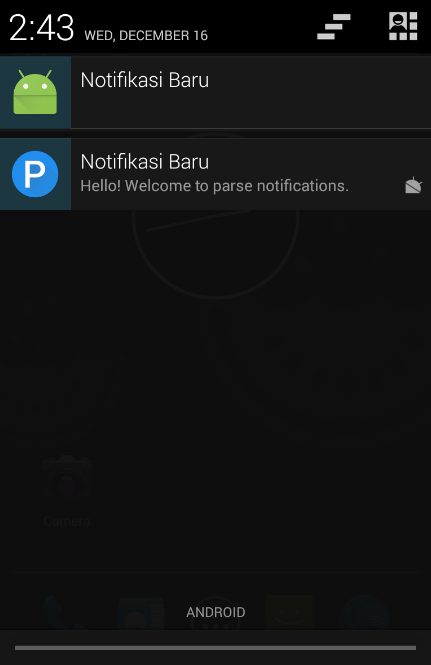
27. tunggu hingga notifikasi muncul pada HP

28. JIka aplikasi dalam keadaan terbuka, maka notifikasi akan masuk kedalam listview


28. Jika aplikasi dalam keadaan tertutup, maka akan ada notifikasi di screen utama


Source : https://github.com/ardhimaarik/parse
~~~~~~~~~~~~~~~~~~~~~~~~~~~~~~~~~~ Sekian ~~~~~~~~~~~~~~~~~~~~~~~~~~~~~~~~


Sekian tutorial yang saya buat, semoga bermanfaat :)